I took a little time in the middle of microphone element repairs to do a Proof-of-Concept for the Easy Button.
Took apart the Staples Easy Button, de-soldered all the components and cut the traces on the PC board, leaving just the button. Ran a pair of wires out and hot-glued them in place so they wouldn't interfere. The button as built makes a lovely stapler "ka-chunk!" noise when pressed, but that was, sadly, inappropriate for use in an FOH station exposed to the audience. However, a little careful re-shaping of the metal spring took the "click" out without changing the firm feel of the button.
I connected it to my all-purpose Arduino-based wire-to-MIDI interface, and plugged that into QLab. The Stage Manager admired it so much she's going to try using it as a GO button for next weekend's performances.
Perhaps by then I will have gotten into my USB-AVR breakout board from Adafruit (or the old and sadly no longer made or supported Bumble-B) and made a more self-contained solution. Or perhaps not! This show is all about exposed technical bits. It's an Atom-Punk setting, after all. I've got a bucket of water with EL wire wrapped around it and a microphone sticking inside...I slosh the water around for a live sound effect in a couple of moments of the show.
(This is very much an insane cludge of a sound design. The effects are on laptop playing both through the headphone jack and through an Ozone USB keyboard for an additional two outputs. OS 10.5 was being stupid about combining these as an Aggregate Device but that turned out to be for the best anyhow. The drums are being submixed via a Presonus FP-10 into Cubase -- for EQ and compression. So I've got a maze of wires running all over the place.)
I've blogged before about the problems I've had in that space, and others, about the conflict between a flat coverage by house speakers, and an equal-loudness mix between vocals and orchestra. The fight is always against monitor leakage (especially when the pit is using amplified instruments like keyboards, basses, and guitars); since monitor leakage models as a large point source it falls off by roughly inverse-square. Since the vocal reinforcement includes delay speakers to cover the rear of the house, the fall off is whatever we set it for. This means that getting decent levels at the rear of the house is essentially at cross-purposes with having the same mix between vocals and band in all parts of the house.
Worse yet, the vocals are coming from distinct point sources high in the air (the center cluster in many shows) and the band source is a large, diffuse source below the level of the stage. This means the singers and the band don't sound like they are in the same universe.
This can actually be a help when you are trying to help the listener/audience discriminate between competing sounds. But the spacialization you really want is that the vocals appear to be coming from the actors....not from some speakers far overhead.
For several shows we've struggled with the problem of poor front fill. With the orchestra pit "in" (aka the elevator lowered and a moat between audience and actors) the front rows are just barely within the field of the main speakers. By ghosting up a center cluster or some high overhead speakers pointing nearly straight down, you can help those first few rows while not completely changing what the rest of the audience hears.
With the pit covered the problem gets worse. And when they chose to add a false proscenium (cutting off all your speaker locations) the problem becomes critical.
After a somewhat rough opening night and several complaints, I came in (exhausted and with less than thirty minutes to work) with a crazy idea. Front fill at stage level will solve this coverage problem of the first rows of seating, but many set designers will not permit the visual look of those speakers intruding upon the lower few inches of sight-lines. Stage fill from the front -- to allow the actors to hear the band -- can usually be snuck in at barely above stage level. I had these, in fact. Which were part of my monitor leakage problem already.
So what I did -- with no time to work -- is turn the front fill monitors around and re-assign them to the reinforcement bus. Since they couldn't of course be on the stage, they went to either side and were angled sharply in (focus point about a third of the way back in the house). And since for various reasons my subwoofers were already sitting on the far corners of the apron, I was able to stick them on top and lift up the speakers by that much.
Then I pulled both the mains and the center cluster from the house mix, leaving it ONLY the newly re-purposed front fills and the delay speakers further back. As the last step, I moved in the side fill monitors and re-angled them to make them the sole stage monitor coverage (the band is really, really loud anyhow).
And it worked. I was shocked at how good that sounded. But then, these were the original top fills and were a pair of lovely, lovely Meyer UPM-1P's. So they are entirely up to the task of being front audience fills.
I suppose if I was really concerned I'd re-focus the center cluster to boost a little through the middle of the audience (right down the center aisle is basically worst coverage from all the systems). I am also slightly concerned about audience in the seats closest to the UPM's, but there is sufficient direct audio pressure from the cast I think that will compensate. I have the UPM's at 8 milliseconds of delay, a compromise between the length of their throw to center and the average 12 millis the entire system is set to (the delay bias here is to allow the actors to be perceived as primary sources via the Haas Effect).
The rear house speakers are still on their Meyer-set delay via the Galileo processor. I did a quick-and-dirty impulse check using a side-stick sample via Garritan Personal Orchestra, and I didn't notice the sound doubling as I walked the speakers from the center to under the rear speakers. And I'm running the rear hot; as close as I've ever been to a flat field across the whole house.
Monday, February 27, 2012


Tuesday, February 14, 2012
Testing, Testing
I enjoy language. So here are a few more bits and phrases I've found useful -- these ones on the subject of testing.
Smoke Test: This is when you turn on the power and see if it smokes and catches fire. If you are really unsure if you configured things right (such as, perhaps you reversed the polarity on the power leads) the more refined trick is to turn it on for just a moment, turn it off before the magic smoke can leak out, then gingerly touch the most sensitive components with a bare finger to see if they are heating up.
A smoke test won't tell if you if the circuit works. But it will tell you if the circuit is broken. But please remember to always mount a scratch monkey!
Sanity Test: more commonly in the form of a sanity check (and I'm sorry to say, but there ain't no sanity clause), this is any sort of trivial throughput check or checksum or order of magnitude calculation; instead of the painstaking check of every line of code or engineering calculation, this is taking the simplest and most obvious check that will reveal that all your elegant math foundered when you multiplied instead of dividing in step 2.
This is why smart DIYers don't spare the blinkenlights. A few LEDs (or a few serial.print comments in a code) can tell you that what you intended certain parts of the circuit to do, they are actually doing.
In sound, a sanity test is done by ignoring all the nice microphones and nifty speaker processors and all of that, and just seeing if you can get a simple CD to play through the house speakers. If you can't, you shouldn't be wasting time setting up delay chains just yet!
Plugs-Out Test: I first ran into this phrase in regards to a terrible accident in space history. But let that not stop us from the idea of removing the umbilicals, and seeing if the device will still run on its own internal battery, without the connection to the ISP, and with the cover of the enclosure screwed down.
Proof-of-Concept: Not usually called a "test," this is similar often misunderstood by those who observe them. The proof-of-concept is done entirely to prove the plausibility of the idea -- it is in no way a test of the actual hardware. Indeed, you substitute, you breadboard, you mock up; whatever you have to do to get the thing to work, even for just a second or two before the tape falls apart.
Solderless breadboards, alligator clips, double-stick tape are your friends here. Simulated signals, simulated outputs. It doesn't matter what it looks like; it matters that it works, even if it only works once.
Coffee Test: This is the test of whether you are awake enough to write code or operate machinery; can you make coffee without doing something mind-bogglingly stupid? I grind the beans, brew hot water in a teapot, and pour it through a gold filter to the mug or flask for the day. This provides plenty of chances to prove I'm not awake yet. Today, I put on the water, cleaned the filter, and ground the beans. I finished just as the water began to boil so I quickly rinsed out the travel mug...then proceeded to carefully fill it with boiling water.
Other times, I've skipped the filter or the coffee entirely. The best day of all, though, was when I was still living in the Haight-Ashbury. I carefully filled a clean mug with milk, then proceeded to add coffee grounds to it. I remember watching the black flecks slowly sink in the full mug of milk and wondering what exactly was wrong with that picture.
On a more serious note, there are a couple more test concepts that are worth adding.
Test-in-Place: Especially with RF gear, funny things happen in the actual location where you mean to use the thing. So it isn't properly tested until it is in the room it will be used in. Better yet, it should be in rehearsal, or in as close to performance conditions as you can manage.
Acid Test: This is when you create a worst-case scenario and see if the thing survives it.
Test to Destruction: Unlike the above, this is when you intentionally fail the unit to find out just what it takes to break it.
Smoke Test: This is when you turn on the power and see if it smokes and catches fire. If you are really unsure if you configured things right (such as, perhaps you reversed the polarity on the power leads) the more refined trick is to turn it on for just a moment, turn it off before the magic smoke can leak out, then gingerly touch the most sensitive components with a bare finger to see if they are heating up.
A smoke test won't tell if you if the circuit works. But it will tell you if the circuit is broken. But please remember to always mount a scratch monkey!
Sanity Test: more commonly in the form of a sanity check (and I'm sorry to say, but there ain't no sanity clause), this is any sort of trivial throughput check or checksum or order of magnitude calculation; instead of the painstaking check of every line of code or engineering calculation, this is taking the simplest and most obvious check that will reveal that all your elegant math foundered when you multiplied instead of dividing in step 2.
This is why smart DIYers don't spare the blinkenlights. A few LEDs (or a few serial.print comments in a code) can tell you that what you intended certain parts of the circuit to do, they are actually doing.
In sound, a sanity test is done by ignoring all the nice microphones and nifty speaker processors and all of that, and just seeing if you can get a simple CD to play through the house speakers. If you can't, you shouldn't be wasting time setting up delay chains just yet!
Plugs-Out Test: I first ran into this phrase in regards to a terrible accident in space history. But let that not stop us from the idea of removing the umbilicals, and seeing if the device will still run on its own internal battery, without the connection to the ISP, and with the cover of the enclosure screwed down.
Proof-of-Concept: Not usually called a "test," this is similar often misunderstood by those who observe them. The proof-of-concept is done entirely to prove the plausibility of the idea -- it is in no way a test of the actual hardware. Indeed, you substitute, you breadboard, you mock up; whatever you have to do to get the thing to work, even for just a second or two before the tape falls apart.
Solderless breadboards, alligator clips, double-stick tape are your friends here. Simulated signals, simulated outputs. It doesn't matter what it looks like; it matters that it works, even if it only works once.

Coffee Test: This is the test of whether you are awake enough to write code or operate machinery; can you make coffee without doing something mind-bogglingly stupid? I grind the beans, brew hot water in a teapot, and pour it through a gold filter to the mug or flask for the day. This provides plenty of chances to prove I'm not awake yet. Today, I put on the water, cleaned the filter, and ground the beans. I finished just as the water began to boil so I quickly rinsed out the travel mug...then proceeded to carefully fill it with boiling water.
Other times, I've skipped the filter or the coffee entirely. The best day of all, though, was when I was still living in the Haight-Ashbury. I carefully filled a clean mug with milk, then proceeded to add coffee grounds to it. I remember watching the black flecks slowly sink in the full mug of milk and wondering what exactly was wrong with that picture.
On a more serious note, there are a couple more test concepts that are worth adding.
Test-in-Place: Especially with RF gear, funny things happen in the actual location where you mean to use the thing. So it isn't properly tested until it is in the room it will be used in. Better yet, it should be in rehearsal, or in as close to performance conditions as you can manage.
Acid Test: This is when you create a worst-case scenario and see if the thing survives it.
Test to Destruction: Unlike the above, this is when you intentionally fail the unit to find out just what it takes to break it.
The Big Easy
I am still throwing around ideas for dedicated Qlab control surfaces, music performance controllers, and linkage systems to allow sensor-driven sound effects, cue-driven servo events, wireless connectivity, etc.
Many of these options currently exist commercially (or semi-commercially, as in open-source kits), but they generally have two flaws; expensive, and fiddly. I'm thinking about robust dedicated systems; things with few visible controls and sealed enclosures that can be handed off to Stage Managers or percussion players or actors.
The trouble with figuring out the functions, and the form factors, of said things is the applications themselves haven't been adequately explored. There are so few options now for controlling sound effect playback from the orchestra pit, or linking a door opening sound to the physical door, or triggering a mechanical effect from a software cue package, that experiments aren't happening.
The design team is unaware of the tools the digital revolution makes available, and before someone like me gets a chance to say "I've got an Arduino-based gadget that can do that," the effect has either been semi-solved with traditional methods, or abandoned as being too difficult.
By the time you get up there and tell them the clock on the wall could easily point at a specific hour via a servo triggered by the lighting cue that is already taking place in that scene, everyone has become so adjusted to the idea that there is no practical way for the clock hands to move they reject the idea as being unnecessary.
I not too long ago went through a hellish sequence of trying to coordinate a slide projector, lighting cues, and sound cues -- when it would have been a one-day hack to control the slides from either of the previous, using DMX or MIDI or even assigning the "advance" button to a non-dim circuit.
In the long run, what I want is plug-and-play; to define a narrow subset of functions and make a device that just does that. One of the tricks to achieving that is making these devices cheap. I can't waste a full Arduino or worse on a single button. I need to work with a bare-bones purpose-designed board with no more than a cheaper AVR on it.
But until the point that tasks have been identified and the use of a digital system tried out in production, what I need instead is more of the experimental breadboards. Or, rather, the next intermediate; things with fewer dangling wires and software peccadilloes than what I have now. Yet, at the same time, devices that have more and more test bed functions on them.
Xbee networks. High-power switches and motor drivers. Sensors.
Which puts these devices in the horrible position of being development platforms in nice boxes with bland faceplates...so less-technically focused end-users can use them and not get scared.
Still, as part of the development I just need to have more building blocks already worked out. I need experience with Xbee links. With sensor conditioning. With motor drivers and high-power switches.
At this point I've generated only two specific applications, and they are so different there hardly seems to be a way to integrate them cleanly. One is the gunshot transmitter. The other is the dedicated Qlab controller.
The former is fairly easy to parameterize. The idea is that prop guns don't normally make a sound, and blank-firing conversions or starter pistols have a host of difficulties that make them less optimal for many productions. My test case was this; I gave the actor a key-fob radio transmitter, and he hid that in one hand, pressing the transmit button simultaneous to squeezing the trigger and jerking back on the prop gun.
The form I imagine is something that would clip easily and non-destructively to almost any prop firearm and detect the motion of the actual trigger via opto-interruptor or similar. Then a transmitter with a compact form factor would send a message out to whatever sound playback software is in use.
Possibly a better form is a butt squeeze -- this could be used on props that didn't have a functioning trigger -- but that would take more calibration.
Making a transmitter small enough to clip to the gun itself without it being visually distracting would not be easy, however. So you'd want a beltpack type transmitter, and a wire running up the arm. And then you have the problem of connecting...
Actually, I just had an even better idea. The "Trigger Finger." Use a bit of flex sensor in a flesh-colored finger cot. Run the wire under the sleeve back to a belt pack. In use, all the actor does is curl his finger sharply as if pulling a trigger. The sensor conditioner detects this and fires off the signal via the wireless connection. Aka it is a one-finger, no wires version of a data glove.
Because of the wireless link this is unlikely to be a cheap system. Of course, if one had spare wireless microphone packs around one could re-purpose one by sending a DTMF-type tone through it. But I find it is simpler to stay in the digital domain. A 424 MHz radio link gives you only enough range to get to a receiver planted on stage, but it is cheap. If you built the sensor conditioner and radio controller around one of the smaller AVRs, you could have a fab house run off a through-hole board that was barely the footprint of a 9V battery.
Alternatively, an Xbee or similar, though more expensive, can be eventually part of a complete Xbee sensor network. But as long as you are putting fifty bucks of computing and radio hardware in the belt pack, plus the cost of the housing itself, you'd best add battery charging and management as well, plus system monitors. Which brings us up to a multiple-unit kit cost in excess of $100 each.
So...I was wrong. The application is well parameterized, but the solution has not been properly designed yet. And even in prototype form, way too much fun not to try to have built by the next Makers Fair.
(Actually, the show I've got coming up includes a chainsaw that won't be practical but should sound like it works. In some other universe I'd be playing around with Kinect or Wii remote ideas to make the sound follow the prop...but for the flow of this show, a canned sound effect will be just fine.)
(I almost forgot an alternate strategy. Instead of going wireless, go light. Basically make a laser tag device, only with a bigger fan-shaped beam. If you want to be really clever, squirt a coded series of pulses like a TV remote does. Otherwise just tune your sensors. The cute idea...although it is of little use in the highly-rehearsed world of traditional theater...is that the gun can trigger multiple sound and/or practical effects by aiming at them in turn. It is possible existing laser sights could be re-purposed for this.)
((And as long as you are being silly, an infrared laser finger could serve -- so could a Wii remote -- to allow a person to play Tim the Sorcerer and trigger effects as he or she pointed at them)).
Anyhow. One of my flaky-pastry-item-in-the-stratosphere desires has been to wire up a Sonic Screwdriver prop with useful functions: Radio link to fire sound effects without having to go back to the sound board (very useful for a quick listen-through, checking stage monitor levels, troubleshooting, etc.) Laser pointer for explaining to crew which speaker is which, and also for use in rough-aligning speakers (I use a crazy device I call the tri-laser now; two laser heads glued to a carpenter's framing square). Emergency flashlight, which in the nature of such things is likely to be used far too often and run down the batteries all the time. Oh, and I'd love to have an SPL meter, a polarity checker...but by this point the device would be considerably larger than a tricorder and that's the wrong TV show entirely.
The other actual parameterized idea is the dedicated QLab controller. There are twin aspects to the application; the first is that while the "Go" button works fine, jumping or repeating cues requires hunting around on the keyboard, and editing cues puts the "Go" function out of focus. MIDI is always "focused"; even if you have hidden the QLab application and are working in a different one altogether, a MIDI "Go" command will work.
The second is that often booth or sound board space is limited. You can't always put a laptop where you can reach it easily. I'm actually quite fond myself of using a keyboard -- usually a battered old Korg Nanokey -- to control Qlab without having to have the laptop within easy fingertip reach. But I think there is a bonus, especially for less technical people, in having a small-footprint controller with big hardy buttons labeled with the universal standard "tape deck" symbology.
Actually, I just thought of an answer to a caveat I've had...the problem with remote use is you really, really want to see the computer's screen and know you are about to fire the right cue. However, nothing says you couldn't hack in a simple character LCD display showing "next" and "playing" cues. Since Qlab doesn't normally care about that, you'd have to leverage something like the MIDI or DMX functions and spend the time to add and write out special "invisible" cues that would send messages back to the remote console. So not really that elegant a hack!
A more complicated but satisfying routine might be to install a full graphic LCD...but then you'd have to both get that to be recognized by the laptop's video out, and drag the right items on to the resulting window.
Anyhow.
Today, I am going to stop by Staple and purchase one (or more) of their "Easy" buttons. This will be my next proof of concept. I have already a few options in arcade buttons and the like, but I'd like to try wiring up this as a big red "Go" button. Or a "fire the sound" button for orchestra pit.
In the development form, just use an Arduino to spit MIDI or MSC. Or use my AVR-USB development board to spit out an HID-standard "space bar."
In the next ranging, figure out how to do MIDI on a naked AVR, or even bit-bang MIDI on one of the ATtiny's with no UART (which is really just an exercise in clever...there is no good reason not to just use an ATtiny45 instead). And then, figure out how to do MIDI-over-USB....HID is relatively easy (or so I am told!) but MIDI-over-USB is a tougher trick.
The ultimate controller form would be USB-powered and USB-linked, with some degree of feedback (at least lighted buttons) and a minimal display to allow entering program mode and changing the system defaults (such as, switching to MSC protocol).
Anyhow. Swartzbrot awaits. I'm off to run errands.
Many of these options currently exist commercially (or semi-commercially, as in open-source kits), but they generally have two flaws; expensive, and fiddly. I'm thinking about robust dedicated systems; things with few visible controls and sealed enclosures that can be handed off to Stage Managers or percussion players or actors.
The trouble with figuring out the functions, and the form factors, of said things is the applications themselves haven't been adequately explored. There are so few options now for controlling sound effect playback from the orchestra pit, or linking a door opening sound to the physical door, or triggering a mechanical effect from a software cue package, that experiments aren't happening.
The design team is unaware of the tools the digital revolution makes available, and before someone like me gets a chance to say "I've got an Arduino-based gadget that can do that," the effect has either been semi-solved with traditional methods, or abandoned as being too difficult.
By the time you get up there and tell them the clock on the wall could easily point at a specific hour via a servo triggered by the lighting cue that is already taking place in that scene, everyone has become so adjusted to the idea that there is no practical way for the clock hands to move they reject the idea as being unnecessary.
I not too long ago went through a hellish sequence of trying to coordinate a slide projector, lighting cues, and sound cues -- when it would have been a one-day hack to control the slides from either of the previous, using DMX or MIDI or even assigning the "advance" button to a non-dim circuit.
In the long run, what I want is plug-and-play; to define a narrow subset of functions and make a device that just does that. One of the tricks to achieving that is making these devices cheap. I can't waste a full Arduino or worse on a single button. I need to work with a bare-bones purpose-designed board with no more than a cheaper AVR on it.
But until the point that tasks have been identified and the use of a digital system tried out in production, what I need instead is more of the experimental breadboards. Or, rather, the next intermediate; things with fewer dangling wires and software peccadilloes than what I have now. Yet, at the same time, devices that have more and more test bed functions on them.
Xbee networks. High-power switches and motor drivers. Sensors.
Which puts these devices in the horrible position of being development platforms in nice boxes with bland faceplates...so less-technically focused end-users can use them and not get scared.
Still, as part of the development I just need to have more building blocks already worked out. I need experience with Xbee links. With sensor conditioning. With motor drivers and high-power switches.
At this point I've generated only two specific applications, and they are so different there hardly seems to be a way to integrate them cleanly. One is the gunshot transmitter. The other is the dedicated Qlab controller.
The former is fairly easy to parameterize. The idea is that prop guns don't normally make a sound, and blank-firing conversions or starter pistols have a host of difficulties that make them less optimal for many productions. My test case was this; I gave the actor a key-fob radio transmitter, and he hid that in one hand, pressing the transmit button simultaneous to squeezing the trigger and jerking back on the prop gun.
The form I imagine is something that would clip easily and non-destructively to almost any prop firearm and detect the motion of the actual trigger via opto-interruptor or similar. Then a transmitter with a compact form factor would send a message out to whatever sound playback software is in use.
Possibly a better form is a butt squeeze -- this could be used on props that didn't have a functioning trigger -- but that would take more calibration.
Making a transmitter small enough to clip to the gun itself without it being visually distracting would not be easy, however. So you'd want a beltpack type transmitter, and a wire running up the arm. And then you have the problem of connecting...
Actually, I just had an even better idea. The "Trigger Finger." Use a bit of flex sensor in a flesh-colored finger cot. Run the wire under the sleeve back to a belt pack. In use, all the actor does is curl his finger sharply as if pulling a trigger. The sensor conditioner detects this and fires off the signal via the wireless connection. Aka it is a one-finger, no wires version of a data glove.
Because of the wireless link this is unlikely to be a cheap system. Of course, if one had spare wireless microphone packs around one could re-purpose one by sending a DTMF-type tone through it. But I find it is simpler to stay in the digital domain. A 424 MHz radio link gives you only enough range to get to a receiver planted on stage, but it is cheap. If you built the sensor conditioner and radio controller around one of the smaller AVRs, you could have a fab house run off a through-hole board that was barely the footprint of a 9V battery.
Alternatively, an Xbee or similar, though more expensive, can be eventually part of a complete Xbee sensor network. But as long as you are putting fifty bucks of computing and radio hardware in the belt pack, plus the cost of the housing itself, you'd best add battery charging and management as well, plus system monitors. Which brings us up to a multiple-unit kit cost in excess of $100 each.
So...I was wrong. The application is well parameterized, but the solution has not been properly designed yet. And even in prototype form, way too much fun not to try to have built by the next Makers Fair.
(Actually, the show I've got coming up includes a chainsaw that won't be practical but should sound like it works. In some other universe I'd be playing around with Kinect or Wii remote ideas to make the sound follow the prop...but for the flow of this show, a canned sound effect will be just fine.)
(I almost forgot an alternate strategy. Instead of going wireless, go light. Basically make a laser tag device, only with a bigger fan-shaped beam. If you want to be really clever, squirt a coded series of pulses like a TV remote does. Otherwise just tune your sensors. The cute idea...although it is of little use in the highly-rehearsed world of traditional theater...is that the gun can trigger multiple sound and/or practical effects by aiming at them in turn. It is possible existing laser sights could be re-purposed for this.)
((And as long as you are being silly, an infrared laser finger could serve -- so could a Wii remote -- to allow a person to play Tim the Sorcerer and trigger effects as he or she pointed at them)).
Anyhow. One of my flaky-pastry-item-in-the-stratosphere desires has been to wire up a Sonic Screwdriver prop with useful functions: Radio link to fire sound effects without having to go back to the sound board (very useful for a quick listen-through, checking stage monitor levels, troubleshooting, etc.) Laser pointer for explaining to crew which speaker is which, and also for use in rough-aligning speakers (I use a crazy device I call the tri-laser now; two laser heads glued to a carpenter's framing square). Emergency flashlight, which in the nature of such things is likely to be used far too often and run down the batteries all the time. Oh, and I'd love to have an SPL meter, a polarity checker...but by this point the device would be considerably larger than a tricorder and that's the wrong TV show entirely.
The other actual parameterized idea is the dedicated QLab controller. There are twin aspects to the application; the first is that while the "Go" button works fine, jumping or repeating cues requires hunting around on the keyboard, and editing cues puts the "Go" function out of focus. MIDI is always "focused"; even if you have hidden the QLab application and are working in a different one altogether, a MIDI "Go" command will work.
The second is that often booth or sound board space is limited. You can't always put a laptop where you can reach it easily. I'm actually quite fond myself of using a keyboard -- usually a battered old Korg Nanokey -- to control Qlab without having to have the laptop within easy fingertip reach. But I think there is a bonus, especially for less technical people, in having a small-footprint controller with big hardy buttons labeled with the universal standard "tape deck" symbology.
Actually, I just thought of an answer to a caveat I've had...the problem with remote use is you really, really want to see the computer's screen and know you are about to fire the right cue. However, nothing says you couldn't hack in a simple character LCD display showing "next" and "playing" cues. Since Qlab doesn't normally care about that, you'd have to leverage something like the MIDI or DMX functions and spend the time to add and write out special "invisible" cues that would send messages back to the remote console. So not really that elegant a hack!
A more complicated but satisfying routine might be to install a full graphic LCD...but then you'd have to both get that to be recognized by the laptop's video out, and drag the right items on to the resulting window.
Anyhow.
Today, I am going to stop by Staple and purchase one (or more) of their "Easy" buttons. This will be my next proof of concept. I have already a few options in arcade buttons and the like, but I'd like to try wiring up this as a big red "Go" button. Or a "fire the sound" button for orchestra pit.
In the development form, just use an Arduino to spit MIDI or MSC. Or use my AVR-USB development board to spit out an HID-standard "space bar."
In the next ranging, figure out how to do MIDI on a naked AVR, or even bit-bang MIDI on one of the ATtiny's with no UART (which is really just an exercise in clever...there is no good reason not to just use an ATtiny45 instead). And then, figure out how to do MIDI-over-USB....HID is relatively easy (or so I am told!) but MIDI-over-USB is a tougher trick.
The ultimate controller form would be USB-powered and USB-linked, with some degree of feedback (at least lighted buttons) and a minimal display to allow entering program mode and changing the system defaults (such as, switching to MSC protocol).
Anyhow. Swartzbrot awaits. I'm off to run errands.
Monday, February 13, 2012
Quick and Dirty...
...like a bunny with, err, dirt on it.
My horrible tech is finally over and the show is open. We're not working there again. Not unless they make some major systemic changes.
You can fake your way through some shows with a "turn the mics on when they sing" approach but you can't fake your way through a loud, pop, in-your-face modern musical like "Wicked" or "Rent" without an actual FOH mixer. Or something very clever to replace them with. We tried. We gave up. I dismantled most of my stone knives and bearskins. Un-taped the twenty-dollar microphone from the chair and stripped out all the orchestra reinforcement. Rented some new units and put the wireless transmitters that are older than some of my cast members back on the shelf.
I've got the entire vocal bus compressed at 2:1 and with a 3dB presence peak thrown on it as well. Horrible, horrible things to be doing to the poor sound. We stuck half the cast on madonna-mics to get the very last bit of gain before feedback. And we told the client we would never design a show for them again.
On a lighter note, I made my own microphone. Sort of. I was expecting to record some location sounds for an upcoming production and I wanted a way to use my $20 boom pole with the minidisc recorder I purchased ten years ago in Tokyo.
Well, I've been repairing wireless microphone elements for the last couple of weeks, and I had several Shure WL185's lying around on the desk. These are giant soup cans of an element and hardly worth sticking a new connector on them as they are a bit large and clunky to tape to an actor's face. (I do like them fine for interview-style lapel mics, though.)
So I took two of them, zip-tied them to a simple coat-hanger support, and spliced them into a single TRS mini-jack. Since they are electret condensers, my Sony MZ-R900 has no trouble powering them. Handling noise is pretty bad but the sound isn't bad once they've been stuck in a mic stand.
Next experiment is to make a psuedo-MS mic out of three elements (two back-to-back cardiods simulating the figure-8, and the third for the front element). Or, since you can get a similar element from Digikey (or a cheap knock-off from Radio Shack) -- the naked element without the nice housing and grill, that is -- I may go the whole DIY microphone thing and build an Mid-Side from scratch.
Why do I want a Mid-Side, specifically? Because that allows me control of the stereo width/room tone. For recording sound effects on location, this is a simple way of having some control over the apparent distance and presence. It just requires doing an M-S matrix during the mix-down.
Or, alternatively, I could rig them in an ORTF configuration. I set them up as coincident pair because that takes less space...ORTF is technically 17 cm in width. Coincident pair can also be summed to mono without phase cancellation, but I'm not exactly worried about that!
I find myself thinking of clever mechanisms that could spread out the elements on little pivoting booms, but such things tend to, by the time you are finished tinkering, cost more than just running down to the pro audio shop and purchasing a pre-made equivalent would be.
The next show has only four pieces in the orchestra pit, but it is a covered pit and the actors are stomping on top of it (all of the dance numbers seem to be really, really stompy!) So this is actually a good reason not to either leave the drums alone, or make do with an overhead and maybe a kick. I'm going to actually go rock and roll and throw as many mics as I have channels at the poor percussionist. Because with all that stomping, I have to get pretty close and isolated with everything down there.
But it is still going to be quick and dirty.
My horrible tech is finally over and the show is open. We're not working there again. Not unless they make some major systemic changes.
You can fake your way through some shows with a "turn the mics on when they sing" approach but you can't fake your way through a loud, pop, in-your-face modern musical like "Wicked" or "Rent" without an actual FOH mixer. Or something very clever to replace them with. We tried. We gave up. I dismantled most of my stone knives and bearskins. Un-taped the twenty-dollar microphone from the chair and stripped out all the orchestra reinforcement. Rented some new units and put the wireless transmitters that are older than some of my cast members back on the shelf.
I've got the entire vocal bus compressed at 2:1 and with a 3dB presence peak thrown on it as well. Horrible, horrible things to be doing to the poor sound. We stuck half the cast on madonna-mics to get the very last bit of gain before feedback. And we told the client we would never design a show for them again.
On a lighter note, I made my own microphone. Sort of. I was expecting to record some location sounds for an upcoming production and I wanted a way to use my $20 boom pole with the minidisc recorder I purchased ten years ago in Tokyo.
Well, I've been repairing wireless microphone elements for the last couple of weeks, and I had several Shure WL185's lying around on the desk. These are giant soup cans of an element and hardly worth sticking a new connector on them as they are a bit large and clunky to tape to an actor's face. (I do like them fine for interview-style lapel mics, though.)
So I took two of them, zip-tied them to a simple coat-hanger support, and spliced them into a single TRS mini-jack. Since they are electret condensers, my Sony MZ-R900 has no trouble powering them. Handling noise is pretty bad but the sound isn't bad once they've been stuck in a mic stand.
Next experiment is to make a psuedo-MS mic out of three elements (two back-to-back cardiods simulating the figure-8, and the third for the front element). Or, since you can get a similar element from Digikey (or a cheap knock-off from Radio Shack) -- the naked element without the nice housing and grill, that is -- I may go the whole DIY microphone thing and build an Mid-Side from scratch.
Why do I want a Mid-Side, specifically? Because that allows me control of the stereo width/room tone. For recording sound effects on location, this is a simple way of having some control over the apparent distance and presence. It just requires doing an M-S matrix during the mix-down.
Or, alternatively, I could rig them in an ORTF configuration. I set them up as coincident pair because that takes less space...ORTF is technically 17 cm in width. Coincident pair can also be summed to mono without phase cancellation, but I'm not exactly worried about that!
I find myself thinking of clever mechanisms that could spread out the elements on little pivoting booms, but such things tend to, by the time you are finished tinkering, cost more than just running down to the pro audio shop and purchasing a pre-made equivalent would be.
The next show has only four pieces in the orchestra pit, but it is a covered pit and the actors are stomping on top of it (all of the dance numbers seem to be really, really stompy!) So this is actually a good reason not to either leave the drums alone, or make do with an overhead and maybe a kick. I'm going to actually go rock and roll and throw as many mics as I have channels at the poor percussionist. Because with all that stomping, I have to get pretty close and isolated with everything down there.
But it is still going to be quick and dirty.
Friday, February 10, 2012
Stone Knives and Bearskins
Two highly technical shows opening within a week of each other. The first opens tonight.
800-seat house, nearly sold out for opening weekend at $45 bucks or more a seat (not counting that thrice-damned GoldStar), 14-piece pit orchestra, thirty-four cast members one of whom was the star of the Broadway production. And, oh yeah, the half the cast are singing into elements salvaged from the recycle box, the band is going through an old Mackie mixer and on the bass is a twenty-dollar mic gaff-taped to a chair.
Show business is of course all about wood spray-painted to look like gold, canvass walls standing in for marble halls, and princely robes salvaged from old fur coats. But this is the most absurdly old, damaged, duct-taped together, barely tolerable gear I've ever been forced to apply to a show that is intended to sound this tight, slick, pop, and in-your-face.
The quote I've been using all week is from original-era, the-one-and-only "Star Trek." Spock is trapped in the past, and is trying to build an interface to his tricorder with what he can afford to get at a ham radio supply store in Chicago in the middle of the Great Depression. A local walks in on him as he is in the middle of struggling with his jerry-rig, and he snarls, "I am endeavoring, ma'am, to construct a duotronic memory unit utilizing stone knives and bearskins."
My wireless mics are a grab-bag of different brands, over half of which lack the punch to even make it to the sound booth. I have receiver packs tucked into every corner of the stage, with miles of XLR running every which way trying to get to and make use of every last one of the sadly limited house wiring. One single solitary snake would help immensely, but the over-protective house goes prompt critical if anything like that is even suggested.
My hookup is a nightmare, and another nightmare faces my A2 as he struggles with multiple mic changes. We've changed so many things in patching around problems there is no longer anything resembling an order to who gets what and where it is located and what input channel it uses. And the directorial team keeps asking for additional voices to be added to the overstressed list.
There is no frequency plot and never will be. Hetrodyne interference is just a fact we live with.
I'm spending hours every day with fine-blade x-acto knife, heat-shrink tubing, and a magnifying face shield repairing breaks in the tiny 2mm cables and rewiring the tiny TA4 and locking 3mm mini jacks and trying to turn more of the bucket of tangled old dead elements into something we can use on stage.
The pit is ankle-deep in cords (which is not unusual for a pit, but I prefer to keep my pits much neater). And as scary as the mix of old cranky underpowered microphones on stage is, the fact that the band is sub-mixed on a mixer that no-one is watching is even scarier. The only control we have from front of house is to turn the submix up or down.
(Well, okay, at this point in the evolution of the hookup, I could break it into three sub groups. But I am not even sure I have the channels left on the FOH mixer to handle that, the sound booth is badly designed and you can't hear what you are doing from inside it (!!) and the mixer has enough on his hands already without trying to mix a band as well.)
So I spent preview night mostly standing behind the brass section, setting up a band mix on headphones. Tonight we hope to try it....ONCE!!...in the house speakers before we open the doors and let the opening night audience in.
No pressure.
But on the whole, I'd rather be knapping flint. Bearskins I can do without, but stone knives actually sounds kinda cool.
I'm revisiting this post years after the fact with a belated after-action report. First off, amplifying the band was a fail. The kind of material we had, a dedicated mixer (the person, not the board) would have been required, and the reasons that wasn't going to happen were as much politics as they were technical.
The cast was so physically stressed in some numbers they couldn't achieve the necessary vocal production. Given an ultimatum to get more gain before feedback ANY WAY we could, we made the gamble to blow multiple times our budget on as many E6 elements as we could get on short order.
It was all very stressful, very depressing, and despite the show selling incredibly well and making a ton of money both me and my business partner decided that would be our last show with that organization.
I actually ran into the producer years later, when he came out to the theater I'd been working almost exclusively at for the last ten years and proceeded to clean house, firing EVERYONE who had been there before (with the sole exception, I believe, of one lighting designer).
Which led pretty directly to me giving up on live sound entirely and getting a day job.
And, yes...I now own a box of obsidian and some basic tools and I have indeed tried knapping a stone knife. No bearskins involved, however.
800-seat house, nearly sold out for opening weekend at $45 bucks or more a seat (not counting that thrice-damned GoldStar), 14-piece pit orchestra, thirty-four cast members one of whom was the star of the Broadway production. And, oh yeah, the half the cast are singing into elements salvaged from the recycle box, the band is going through an old Mackie mixer and on the bass is a twenty-dollar mic gaff-taped to a chair.
Show business is of course all about wood spray-painted to look like gold, canvass walls standing in for marble halls, and princely robes salvaged from old fur coats. But this is the most absurdly old, damaged, duct-taped together, barely tolerable gear I've ever been forced to apply to a show that is intended to sound this tight, slick, pop, and in-your-face.
The quote I've been using all week is from original-era, the-one-and-only "Star Trek." Spock is trapped in the past, and is trying to build an interface to his tricorder with what he can afford to get at a ham radio supply store in Chicago in the middle of the Great Depression. A local walks in on him as he is in the middle of struggling with his jerry-rig, and he snarls, "I am endeavoring, ma'am, to construct a duotronic memory unit utilizing stone knives and bearskins."
My wireless mics are a grab-bag of different brands, over half of which lack the punch to even make it to the sound booth. I have receiver packs tucked into every corner of the stage, with miles of XLR running every which way trying to get to and make use of every last one of the sadly limited house wiring. One single solitary snake would help immensely, but the over-protective house goes prompt critical if anything like that is even suggested.
My hookup is a nightmare, and another nightmare faces my A2 as he struggles with multiple mic changes. We've changed so many things in patching around problems there is no longer anything resembling an order to who gets what and where it is located and what input channel it uses. And the directorial team keeps asking for additional voices to be added to the overstressed list.
There is no frequency plot and never will be. Hetrodyne interference is just a fact we live with.
I'm spending hours every day with fine-blade x-acto knife, heat-shrink tubing, and a magnifying face shield repairing breaks in the tiny 2mm cables and rewiring the tiny TA4 and locking 3mm mini jacks and trying to turn more of the bucket of tangled old dead elements into something we can use on stage.
The pit is ankle-deep in cords (which is not unusual for a pit, but I prefer to keep my pits much neater). And as scary as the mix of old cranky underpowered microphones on stage is, the fact that the band is sub-mixed on a mixer that no-one is watching is even scarier. The only control we have from front of house is to turn the submix up or down.
(Well, okay, at this point in the evolution of the hookup, I could break it into three sub groups. But I am not even sure I have the channels left on the FOH mixer to handle that, the sound booth is badly designed and you can't hear what you are doing from inside it (!!) and the mixer has enough on his hands already without trying to mix a band as well.)
So I spent preview night mostly standing behind the brass section, setting up a band mix on headphones. Tonight we hope to try it....ONCE!!...in the house speakers before we open the doors and let the opening night audience in.
No pressure.
But on the whole, I'd rather be knapping flint. Bearskins I can do without, but stone knives actually sounds kinda cool.
I'm revisiting this post years after the fact with a belated after-action report. First off, amplifying the band was a fail. The kind of material we had, a dedicated mixer (the person, not the board) would have been required, and the reasons that wasn't going to happen were as much politics as they were technical.
The cast was so physically stressed in some numbers they couldn't achieve the necessary vocal production. Given an ultimatum to get more gain before feedback ANY WAY we could, we made the gamble to blow multiple times our budget on as many E6 elements as we could get on short order.
It was all very stressful, very depressing, and despite the show selling incredibly well and making a ton of money both me and my business partner decided that would be our last show with that organization.
I actually ran into the producer years later, when he came out to the theater I'd been working almost exclusively at for the last ten years and proceeded to clean house, firing EVERYONE who had been there before (with the sole exception, I believe, of one lighting designer).
Which led pretty directly to me giving up on live sound entirely and getting a day job.
And, yes...I now own a box of obsidian and some basic tools and I have indeed tried knapping a stone knife. No bearskins involved, however.
Thursday, February 2, 2012
Short
At pretty much every level of this business, if you want the best performance you will be bringing your own gear. The difference being that at the classier places you bring gear because you are used to your own stuff and can work more efficiently with it; at the mid-range places you bring your own gear because the house doesn't have quite the same quality in all categories; and at the lowest levels you bring your own gear because the house doesn't have any at all.
Pretty much goes with this equation that this is a cost out of pocket. Few houses will reimburse for the use, or the ordinary wear and tear, of all the mics and headphones you bring. (I bring my own CABLE most places -- because the house cable is rarely stowed correctly and doesn't get tested quite so often, and load-in is too short and too hectic to deal with untangling some-one else's mess only to end up with the crackle of a bad connection.)
There is a bit of horse-trading going on too, but the problem is, from the middle on down everyone is shy of horses. You might have an extra cart to trade at one place, and extra hay at another, but EVERYONE needs that extra horse and no-one has one to spare.
And that's where I am right now. Two of the most complex shows of the season opening simultaneously in different venues. Where normally I'd have a bunch of powered monitors, a small selection of mics and stands, my venerable Mackie mixer, Lexie processor, and of course multiple channels of wireless mics to dedicate to one, this month I am facing a situation where two (or, rather, THREE) different venues all need the stuff.
And not a one of the venues can afford to pay rent for the gear they'd normally get from me for free. And of course since all three productions are simultaneous, none of these places can afford to lend to another one, either.
So I'm working through paperwork now trying to stretch four circuits to cover eight instruments, 19 wireless mics to cover a cast of 32...and also looking at trying to use some old Yamaha speakers as floor monitors (to replace the nice monitors I'll be using in a pit elsewhere), and in true trickle-down fashion, finding a really, really big hiding place to get the old house speakers re-installed with whatever amp I can scrounge so as to replace the missing effects speakers...which in turn are going to try to be a half-assed front fill.
Well, back to the paperwork. I've been at it for nearly twenty hours now, and have gone through six different attempts to graphically abstract the data so as to detect possible patterns. I think, seriously, before the next time this comes up I'm going to take a little time to crank out a software program to do this for me!
Pretty much goes with this equation that this is a cost out of pocket. Few houses will reimburse for the use, or the ordinary wear and tear, of all the mics and headphones you bring. (I bring my own CABLE most places -- because the house cable is rarely stowed correctly and doesn't get tested quite so often, and load-in is too short and too hectic to deal with untangling some-one else's mess only to end up with the crackle of a bad connection.)
There is a bit of horse-trading going on too, but the problem is, from the middle on down everyone is shy of horses. You might have an extra cart to trade at one place, and extra hay at another, but EVERYONE needs that extra horse and no-one has one to spare.
And that's where I am right now. Two of the most complex shows of the season opening simultaneously in different venues. Where normally I'd have a bunch of powered monitors, a small selection of mics and stands, my venerable Mackie mixer, Lexie processor, and of course multiple channels of wireless mics to dedicate to one, this month I am facing a situation where two (or, rather, THREE) different venues all need the stuff.
And not a one of the venues can afford to pay rent for the gear they'd normally get from me for free. And of course since all three productions are simultaneous, none of these places can afford to lend to another one, either.
So I'm working through paperwork now trying to stretch four circuits to cover eight instruments, 19 wireless mics to cover a cast of 32...and also looking at trying to use some old Yamaha speakers as floor monitors (to replace the nice monitors I'll be using in a pit elsewhere), and in true trickle-down fashion, finding a really, really big hiding place to get the old house speakers re-installed with whatever amp I can scrounge so as to replace the missing effects speakers...which in turn are going to try to be a half-assed front fill.
Well, back to the paperwork. I've been at it for nearly twenty hours now, and have gone through six different attempts to graphically abstract the data so as to detect possible patterns. I think, seriously, before the next time this comes up I'm going to take a little time to crank out a software program to do this for me!
Saturday, January 28, 2012
Anatomy of a Cue
As a continuation of the discussion in the last post, I'm going to walk through the creation of a single cue in some detail. The cue in question is one of those lovely long, exposed, story-telling cues you rarely get to do; in this case, an audio slice of a drive-in movie. It is used in the production I just opened.
The voice-over session:
As with most cues involving dialog, the actual dialog to be used is specified in the original script (the show in this case is Grease and the lines in the B Movie sets up the drive-in scene and a song.)
In this case I didn't have to go looking for vocal talent; members of the cast had already been picked and had been doing the lines during rehearsal. The latter was a mixed blessing; although they didn't need to hold scripts, having already memorized the lines, that also meant I lost the chance to mark up the lines to better shape the line readings.
When I do voice-over work, I like to print the lines in big type, double spaced, one "take" to a page. The professionals will take the opportunity to mark breath pauses, special or problem pronunciation, emphasis needed, etc.
In this case I had flat, rote performances to start from. Working closely with the director we were able to delve into the meaning of the lines, find the important beats, and get those beats into the vocal performance. ("Beats" in the acting terminology sense.)
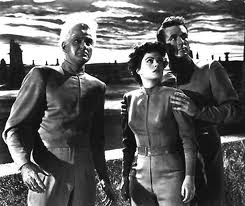 I've said this before; physicality is key. If I had time, I would have actually blocked the scene to give the change in voice that movement would cause. I was able to rework the second movie excerpt by requesting the voice actor playing the "hero" stand behind, with his hands on the shoulders of, the actress playing the "girl." This is a very, very typical couples pose in movies of the period. Looking over her shoulder like that caused the actor to give a more warm, comforting performance than the flat, affect-less performance he had been giving before that direction.
In a long-ago session, I recorded an actor seated, and had him rise from his chair when he reached a more emotionally intense motion. It can not be said enough; physicality shows up in the voice.
(The great, great story comes from the creation of the music for the Lord of the Rings computer games. The male chorus was giving a flat and lifeless rendition of the Dwarves song -- until the conductor had the men shift their weight from one foot to the other as they sung.)
Also unfortunately, we had only the theater lobby to work in, and it was raining. I knew I was going to get both room tone and extraneous noise on the track, but I felt I could probably work around it anyhow. Often in theater you have to accept what will work instead of what would be wonderful, because opening night is coming far too soon. And beside, if this cue is not as great as it could have been, you know there will be another show, and another opportunity, next month.
I set up an omni mic as back-up, but my primary mic was my home-made budget fish-pole boom.
I'm going to explain that, too. The fish-pole is the simplest kind of boom mic; nothing but a long stick with the mic at one end. The idea is to come down from above and stop just out of frame (that is, out of the frame of the camera for an actual movie). I've found it is also an excellent sound for voice-over work.
Putting microphones in front of talent causes many of them to deliver a performance to the mic; they get small, they talk into the mic. The voice you often want -- the voice I most certainly wanted for an imaginary scene from a B Movie -- is one that is large, space-filling, and directed out. So using the fishpole removes that obvious thing-to-talk-into and forces them to act to the room, to their partners, and to the imaginary audience.
A mic that is below the head, or even at mouth level, is a less pleasing sound than one that is aimed towards the forehead. This is why the hairline is the superior position for wireless microphones. A boom coming down from above and forward is a very natural, pleasing sound that mimics well how we perceive voices sound like in ordinary surroundings.
Here's the budget fish-pole (I should write another Instructable -- it was an Instructable I got the idea from!) Get one of those extending poles they use to change lightbulbs in big buildings. I found one for under thirty bucks at Orchard Supply Hardware. The fittings on the top screwed on with the same screw as found on industrial brooms and mops. I used a grinder to make the screw just a little smaller; until I could force a microphone clip over it. Then I mixed up some epoxy and stuck a universal microphone clip (another ten bucks) on to the end.
I don't have a Sennheiser MKH-416, but I do have a Shure PG-81; a mere cardiod (instead of short shotgun) but at the boom distances I work with it works just fine.
I boomed this time through my Mackie mixer, mostly for the headphone amp; this way I can wear headphones and hear what I am recording during the session. I followed the actors somewhat, shifting the boom a little to be closer to whoever was speaking at that moment. For such a short "scene," it was easy enough to memorize the necessary moves. Had they had blocking, that, too, would have been easy enough to memorize.
Of course blocking would have meant I would have had to walk around while holding up the boom...this is why actual good boom operators are valued members of the production sound team in the film world. I'm a pretend operator, totally self-taught, but I do it for the results I've heard in my voice-over recordings. (Plus, it looks cool and gives the actors a kick!)
Anyhow...as many takes as we had time for, made sure the file had saved properly to hard disk, and on to the next step.
Oh, and I knew I had a "mojo" take in the can. Most sessions, there will be one take that will make you sit up straight. Something about it cuts through the boredom of familiarity and makes the material fresh and exciting again. Nine times out of ten, that's the take you will end up using.
Processing the vocal tracks:
This has been a dry entry so far: let's enliven it with some pictures.
 Here's the raw recording session in Audacity. I recorded at a basic 44.1/16 bit depth; the cue didn't call for anything more. In Audacity, I listened through the various takes and selected the take I would use -- yes, it was that "mojo" take -- copied that to a fresh file and normalized.
As I had feared, the rain came through. In an annoying fashion. If I had been more pressed for time I might have worked with the rain instead, but since it was a relatively constant sound I was able to remove most of it from the track with SoundSoap SE (purchased at half price as a special from Musician's Friend).
 The trick to digital noise removal is to have a nice chunk of sound file that doesn't have anything on it you want to keep. The breaks between sessions, for instance. This is also another good reason to record a few minutes of room tone, without any dialog in it. After that it is a matter of ears and judgment to take out as much noise as is plausible without causing audible artifacts.
I read an interview with a production sound person recently and he stated the best way to do noise removal is to use several different methods. Every method leaves artifacts. If you turn any single process up until all the noise is gone, you inevitable turn up some objectionable sound. So instead you apply a bunch of different processes and as each leaves different footprints on the sound, those footprints are smaller and more easily hidden.
Anyhow -- SoundSoap was the first step, and that knocked the rain down until it wasn't objectionable. Now I could import the files into Cuebase and continue to knock them into shape.
Within Cubase I cloned the track, once for each speaker, then chopped each track until only the lines of one speaker appeared on it. This meant I could apply custom equalization and compression to each individual speaker despite them having originally been on a single mono track.

The gaps between their lines made this possible. But now that I was in an audio sequencer, I could also tighten that up a bit; I shifted several of the chunks of dialog in space in order to either close the gaps between speakers, or to allow insertion of an effect.
There was also a door that opened in the middle of the take. Of course this was the mojo take. Fortunately the door sound only occurred over one short chunk of dialog, so I pasted in those same lines from one of the other takes. The speaking tempo was different in that performance, however. But more luck; a time stretch operation, and not only did it fit the gap, it also gave the words more gravitas; it was a better line that way than what we had originally recorded.
I believe I may have applied a very slight pitch shift to one of the speakers as well, but for this project it was important to me to be honest to the voices of the original actors; to enhance them, not to hide or change them.
 The girl's vocal levels shifted enough (my own clumsy boom operating was partly to blame!) and trying to fix that with compression would result in too funny a sound. Thus hand-drawn volume changes, akin to what we call "riding the fader" in live music, to bring it to a consistent level where the processors could work on it.
I worried at this point I might have to cut in room tone in every gap between dialog chunks, but I ended up going the other way: the lobby we recorded in was a little too "live" for what we were doing and I was getting some echo off the walls. Each vocal channel got, as a result, a hefty chunk of expander, set to an ultra-fast pick-up to close down the moment the last vowel sound left the actor's mouth.
Again this is a matter of listening carefully and balancing one unwanted artifact against another.
In period, dialog tended to be quite dry unless an unusual environment was being suggested (like an echoing cave). For that matter, there was a lot less production audio in the 50's; noisy cameras and so forth meant some films were entirely shot MOS and all the dialog picked up later in ADR.
Err...I'm showing off here with film terminology, and there aren't exact relationships to theater practice. "MOS" is filmed without sound. "ADR" is Automatic Dialog Replacement; the poor actor stands in front of a mic watching themselves on a screen and tries to lip-synch in the reverse direction (aka matching the words to the lips).
But this is also a philosophical question you hit every time you do a period show; how much do you want to be accurate to period, and how much do you bend to the expectations and perceptions of a modern audience? I have a byword I go to often; nothing is "old-fashioned" at the time. For someone living in the 50's, they were listening to top-notch, state-of-the-art studio sound. So we have a choice as a designer; to point a finger in laughter at the quaint past we are presenting, or to bring the audience back with us to experience an earlier time as the people back then lived it.
Anyhow...the choice made this time was to do relatively modern dialog recording methods. Or, to put it another way, dialog the way most of the audience are used to hearing it.
When I'm working on a voice-over taken on a close mic (say, for a radio announcer), I often have to manually edit out plosives. Another manual edit is when your actor manages to swallow a key consonant -- you can actually paste one in from a different part of the performance. But this is long, painstaking work and you really hope you don't have to get that detailed on your tracks (I had to do this once with quarter-inch tape and a razor blade, way way back on a production of Diary of Anne Frank!)
Foley:
So now the dialog was done. The client apparently expected this is where my work would stop. I knew it wouldn't; without something to look at, raw dialog can be very, very dry and boring. I played the edited dialog track in rehearsal and it was obvious it needed something more.
The first thing I tried was filling some of the space with Foley.
Well, not really. In the film world, even when there is production sound the intent by the production recordist is to get clean dialog. Not all the other sounds. Film is a world of artficial focus. Instead of hearing all the sounds of an environment, you hear a careful selection of sounds; those sounds that are most essential towards painting a picture. In film parlance, some of these are "hard effects" -- things seen on screen that have some sort of directly applicable sound effect, like motor noise on a passing car or a gun going off. Some are Foley; these are all the sounds of the characters of the film in motion; the footsteps, the clothing rustles, the fumbling hands, rattle of change in a pocket, etc.
In the film world, these sound are produced by talented, rhythmic and athletic people known as Foley Artists (or, sometimes, Foley Dancers). They perform, like the actor in ADR, in front of a screen, but what they perform is footsteps and small parts and hand tools and bedsheets being pulled and all those other small, usually-human sounds.
So it is a misnomer to say you add Foley to a radio play. You can add similar effects, but the process is much different. Instead of matching to visual, you are trying to substitute for a visual. And there lies the problem. Foley sounds by their nature are fluid and indistinct. They mean something because we see the object that we expect to be making sound. Without seeing a man pull on a sweater, the soft slipping sounds you hear could be anything.
I've found that in general the more concrete sounds work best. Footsteps are great. And then of course what would be "hard" effects; doors, cars, gunshots, etc. You can do some fumbling and some cloth stuff, but it is more like an overall sweetener. Used nakedly, the subtler sounds tend to come across more as noise that snuck into the recording, than as sounds you designed in!
I had a cue for a previous show that was a scuffle taking place just off stage. The artists, taking their cue from the director, recorded the vocals while standing around a table. Dead, dead, dead! I was able to sell some of the scuffle with added sound effects I recorded on the spot, however -- including slapping myself so hard I got a headache!

There's the period problem again; the 50's was light on Foley (modern films are swimming in effects, and the effects are strongly present and heavily sweetened). In contrast a 50's film can be very dry. Even the effects tend to stand out isolated.
Anyhow...I cut a bunch of individual footsteps out of a recording of footsteps on leaves, did some pitch shifting and so forth, and arranged them to suggest some of the blocking that didn't actually take place. But it didn't quite fill the space properly. The effort didn't sound like a film yet. It sounded more like a noisy recording.
Music:
I am always leery about introducing music within a musical. In another cue for the same production, I conferred with the Music Director to find out what key the following song began in, and made sure my sound was within that key. This is even more critical when your sound has a defined pitch center and will be overlapping some of the music.
For a full-length movie or more typical theatrical underscore the first composing step is to basically sit at a piano and noodle; to come up with some kinds of themes and motifs. For an except this short, I knew I'd be basically comping; even if a motif showed up, it would be created just for that moment anyhow.
 So I put the completed dialog track on loop, plugged in a VST instrument, and started noodling along to see what sort of musical development might occur and what the tempo might be.
Musically, the major moments were as follows; first the girl talks about her encounter with the werewolf. The hero briefly comforts her. Then the Doctor speaks up in one of those "for the benefit of the audience" speeches that in B Movies are often the big morality lecture at the end; "Perhaps Man was not meant to explore space." What I heard in my head for this moment was a french horn or somber brass doing a stately slow march with much gravitas; the "grand philosophical themes are being discussed here" effect.
Okay, and then the switch; the girl reveals the werewolf is her brother AND is a stock car racer (!!!) And to finish up this emotional turning point, the hero notices there is a full moon (apparently rising over the local dirt racing track).
And orchestral scoring didn't work. It probably would have worked if I had had time, but it would have required enough MIDI tracks to write by section and fill out a full studio orchestra; at least three violins, 'cello, base, two winds, keyboard, percussion, etc. And I'd have to spend the time to work out harmonic development and voice leading for all these parts. A good week of work to do it right. Plus of course movie music of the 50's had a particular sound informed both by aesthetics, circumstance, and technical limitations. So more work there in altering the sound of the instruments to feel appropriate and to blend into that distinctive sound.
 So the alternative was to score on the cheap; to use as so many budget movies of the time had, the venerable Hammond B3 to comp and noodle through most of the score (with, one presumes, more instruments budgeted for the big title track).
And that also gave me an exciting and iconic way to treat the big turning point; an electric guitar.
Jump back a page. One of the requirements for this effect, stated directly in the script, is "werewolf howls." During the VO session, the director mentioned she did a great werewolf, and demonstrated. Which, since I am a canny and experienced recordist, I captured on one of the mics that was open at the time. With some processing and clean-up that became the werewolf effect for the show.
I liked it so much because of an unexpected quality. This was not a dirty, animalistic sound. There was no slaver in it. Nor was it a mournful, poor-me-I've-become-a-monster sound. Instead it was a full-throated "I'm a wolf and this is my night to howl!"
Which changed, in my mind, the entire character of the movie. Up until the emotional turning point it has been a sad, somber (remember those french horns?) depiction of the descent of an innocent young man into some horrible transformation. Then the wolf howls, accompanied by an upbeat electric guitar chord; this a wolf that revels in his transformation and is not about to be steamrollered by fate. He's gonna howl, and he's gonna win that stock car race, too. If he can just figure out how to get his paw around the stick shift!
So the new version of the score was a mere pedal point under the girl's first speech, then a somber minor-key progression of chords under the Doctor's big speech ("The radiation has transformed him into some kind of a monster, half man, half beast.") And then a jangling electric guitar over the howl of the wolf.
 I got lucky; the Doctor's speech worked out to six bars at 110 BPM; I was able to establish a tempo track and turn on the metronome while recording the organ part. The characteristic swell pedal effect of the B3 was roughed in with the volume slider on my keyboard and cleaned up manually in the piano roll view.
But then I went back once again, because the script specifically says "eerie music" and besides just opening with the girl's lightly-underscored dialog wasn't selling the moment -- nor was it making a clear transition from the previous scene change.
So I added a theramin at the top. This is sort of a-chronological; we are joining the movie in the middle of a scene. There is not really a theramin at that point of the score (can you say it isn't diegetic there?) Instead this is like an overlapping sound from the previous scene; at some point before we joined the scene there was a theramin, plus a brassy main title track, and who knows what else. But as we join the scene, that extra-scene element is just fading out.
Well, I think it comes across the way I intended it!
The theramin, by the way, is pre-recorded. I didn't have time to try to perform and/or draw a convincing and idiomatic theramin, and I don't own a real one at the moment. So instead I purchased a pre-existing bit off of my usual supplier.
 Anyhow. Last step is to route all the VST instruments to a group bus and apply bus effects to it; a bit of reverb and EQ mostly.
And then to do some overall effects using the master effects section; a fairly strong mid-range EQ, mostly, to make the track pop and to give just a little sense of being a period film soundtrack (I didn't want to go too far in this direction -- the aesthetic concept again of hearing the sound as the people of the time would have heard it. But, also, the track was so nice I hated to grunge it up!)
The voice-over session:
As with most cues involving dialog, the actual dialog to be used is specified in the original script (the show in this case is Grease and the lines in the B Movie sets up the drive-in scene and a song.)
In this case I didn't have to go looking for vocal talent; members of the cast had already been picked and had been doing the lines during rehearsal. The latter was a mixed blessing; although they didn't need to hold scripts, having already memorized the lines, that also meant I lost the chance to mark up the lines to better shape the line readings.
When I do voice-over work, I like to print the lines in big type, double spaced, one "take" to a page. The professionals will take the opportunity to mark breath pauses, special or problem pronunciation, emphasis needed, etc.
In this case I had flat, rote performances to start from. Working closely with the director we were able to delve into the meaning of the lines, find the important beats, and get those beats into the vocal performance. ("Beats" in the acting terminology sense.)
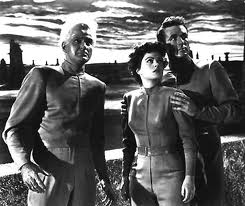
In a long-ago session, I recorded an actor seated, and had him rise from his chair when he reached a more emotionally intense motion. It can not be said enough; physicality shows up in the voice.
(The great, great story comes from the creation of the music for the Lord of the Rings computer games. The male chorus was giving a flat and lifeless rendition of the Dwarves song -- until the conductor had the men shift their weight from one foot to the other as they sung.)
Also unfortunately, we had only the theater lobby to work in, and it was raining. I knew I was going to get both room tone and extraneous noise on the track, but I felt I could probably work around it anyhow. Often in theater you have to accept what will work instead of what would be wonderful, because opening night is coming far too soon. And beside, if this cue is not as great as it could have been, you know there will be another show, and another opportunity, next month.
I set up an omni mic as back-up, but my primary mic was my home-made budget fish-pole boom.
I'm going to explain that, too. The fish-pole is the simplest kind of boom mic; nothing but a long stick with the mic at one end. The idea is to come down from above and stop just out of frame (that is, out of the frame of the camera for an actual movie). I've found it is also an excellent sound for voice-over work.
Putting microphones in front of talent causes many of them to deliver a performance to the mic; they get small, they talk into the mic. The voice you often want -- the voice I most certainly wanted for an imaginary scene from a B Movie -- is one that is large, space-filling, and directed out. So using the fishpole removes that obvious thing-to-talk-into and forces them to act to the room, to their partners, and to the imaginary audience.
A mic that is below the head, or even at mouth level, is a less pleasing sound than one that is aimed towards the forehead. This is why the hairline is the superior position for wireless microphones. A boom coming down from above and forward is a very natural, pleasing sound that mimics well how we perceive voices sound like in ordinary surroundings.
Here's the budget fish-pole (I should write another Instructable -- it was an Instructable I got the idea from!) Get one of those extending poles they use to change lightbulbs in big buildings. I found one for under thirty bucks at Orchard Supply Hardware. The fittings on the top screwed on with the same screw as found on industrial brooms and mops. I used a grinder to make the screw just a little smaller; until I could force a microphone clip over it. Then I mixed up some epoxy and stuck a universal microphone clip (another ten bucks) on to the end.
I don't have a Sennheiser MKH-416, but I do have a Shure PG-81; a mere cardiod (instead of short shotgun) but at the boom distances I work with it works just fine.
I boomed this time through my Mackie mixer, mostly for the headphone amp; this way I can wear headphones and hear what I am recording during the session. I followed the actors somewhat, shifting the boom a little to be closer to whoever was speaking at that moment. For such a short "scene," it was easy enough to memorize the necessary moves. Had they had blocking, that, too, would have been easy enough to memorize.
Of course blocking would have meant I would have had to walk around while holding up the boom...this is why actual good boom operators are valued members of the production sound team in the film world. I'm a pretend operator, totally self-taught, but I do it for the results I've heard in my voice-over recordings. (Plus, it looks cool and gives the actors a kick!)
Anyhow...as many takes as we had time for, made sure the file had saved properly to hard disk, and on to the next step.
Oh, and I knew I had a "mojo" take in the can. Most sessions, there will be one take that will make you sit up straight. Something about it cuts through the boredom of familiarity and makes the material fresh and exciting again. Nine times out of ten, that's the take you will end up using.
Processing the vocal tracks:
This has been a dry entry so far: let's enliven it with some pictures.

As I had feared, the rain came through. In an annoying fashion. If I had been more pressed for time I might have worked with the rain instead, but since it was a relatively constant sound I was able to remove most of it from the track with SoundSoap SE (purchased at half price as a special from Musician's Friend).

I read an interview with a production sound person recently and he stated the best way to do noise removal is to use several different methods. Every method leaves artifacts. If you turn any single process up until all the noise is gone, you inevitable turn up some objectionable sound. So instead you apply a bunch of different processes and as each leaves different footprints on the sound, those footprints are smaller and more easily hidden.
Anyhow -- SoundSoap was the first step, and that knocked the rain down until it wasn't objectionable. Now I could import the files into Cuebase and continue to knock them into shape.
Within Cubase I cloned the track, once for each speaker, then chopped each track until only the lines of one speaker appeared on it. This meant I could apply custom equalization and compression to each individual speaker despite them having originally been on a single mono track.

The gaps between their lines made this possible. But now that I was in an audio sequencer, I could also tighten that up a bit; I shifted several of the chunks of dialog in space in order to either close the gaps between speakers, or to allow insertion of an effect.
There was also a door that opened in the middle of the take. Of course this was the mojo take. Fortunately the door sound only occurred over one short chunk of dialog, so I pasted in those same lines from one of the other takes. The speaking tempo was different in that performance, however. But more luck; a time stretch operation, and not only did it fit the gap, it also gave the words more gravitas; it was a better line that way than what we had originally recorded.
I believe I may have applied a very slight pitch shift to one of the speakers as well, but for this project it was important to me to be honest to the voices of the original actors; to enhance them, not to hide or change them.

I worried at this point I might have to cut in room tone in every gap between dialog chunks, but I ended up going the other way: the lobby we recorded in was a little too "live" for what we were doing and I was getting some echo off the walls. Each vocal channel got, as a result, a hefty chunk of expander, set to an ultra-fast pick-up to close down the moment the last vowel sound left the actor's mouth.
Again this is a matter of listening carefully and balancing one unwanted artifact against another.
In period, dialog tended to be quite dry unless an unusual environment was being suggested (like an echoing cave). For that matter, there was a lot less production audio in the 50's; noisy cameras and so forth meant some films were entirely shot MOS and all the dialog picked up later in ADR.
Err...I'm showing off here with film terminology, and there aren't exact relationships to theater practice. "MOS" is filmed without sound. "ADR" is Automatic Dialog Replacement; the poor actor stands in front of a mic watching themselves on a screen and tries to lip-synch in the reverse direction (aka matching the words to the lips).
But this is also a philosophical question you hit every time you do a period show; how much do you want to be accurate to period, and how much do you bend to the expectations and perceptions of a modern audience? I have a byword I go to often; nothing is "old-fashioned" at the time. For someone living in the 50's, they were listening to top-notch, state-of-the-art studio sound. So we have a choice as a designer; to point a finger in laughter at the quaint past we are presenting, or to bring the audience back with us to experience an earlier time as the people back then lived it.
Anyhow...the choice made this time was to do relatively modern dialog recording methods. Or, to put it another way, dialog the way most of the audience are used to hearing it.
When I'm working on a voice-over taken on a close mic (say, for a radio announcer), I often have to manually edit out plosives. Another manual edit is when your actor manages to swallow a key consonant -- you can actually paste one in from a different part of the performance. But this is long, painstaking work and you really hope you don't have to get that detailed on your tracks (I had to do this once with quarter-inch tape and a razor blade, way way back on a production of Diary of Anne Frank!)
Foley:
So now the dialog was done. The client apparently expected this is where my work would stop. I knew it wouldn't; without something to look at, raw dialog can be very, very dry and boring. I played the edited dialog track in rehearsal and it was obvious it needed something more.
The first thing I tried was filling some of the space with Foley.
Well, not really. In the film world, even when there is production sound the intent by the production recordist is to get clean dialog. Not all the other sounds. Film is a world of artficial focus. Instead of hearing all the sounds of an environment, you hear a careful selection of sounds; those sounds that are most essential towards painting a picture. In film parlance, some of these are "hard effects" -- things seen on screen that have some sort of directly applicable sound effect, like motor noise on a passing car or a gun going off. Some are Foley; these are all the sounds of the characters of the film in motion; the footsteps, the clothing rustles, the fumbling hands, rattle of change in a pocket, etc.
In the film world, these sound are produced by talented, rhythmic and athletic people known as Foley Artists (or, sometimes, Foley Dancers). They perform, like the actor in ADR, in front of a screen, but what they perform is footsteps and small parts and hand tools and bedsheets being pulled and all those other small, usually-human sounds.
So it is a misnomer to say you add Foley to a radio play. You can add similar effects, but the process is much different. Instead of matching to visual, you are trying to substitute for a visual. And there lies the problem. Foley sounds by their nature are fluid and indistinct. They mean something because we see the object that we expect to be making sound. Without seeing a man pull on a sweater, the soft slipping sounds you hear could be anything.
I've found that in general the more concrete sounds work best. Footsteps are great. And then of course what would be "hard" effects; doors, cars, gunshots, etc. You can do some fumbling and some cloth stuff, but it is more like an overall sweetener. Used nakedly, the subtler sounds tend to come across more as noise that snuck into the recording, than as sounds you designed in!
I had a cue for a previous show that was a scuffle taking place just off stage. The artists, taking their cue from the director, recorded the vocals while standing around a table. Dead, dead, dead! I was able to sell some of the scuffle with added sound effects I recorded on the spot, however -- including slapping myself so hard I got a headache!

There's the period problem again; the 50's was light on Foley (modern films are swimming in effects, and the effects are strongly present and heavily sweetened). In contrast a 50's film can be very dry. Even the effects tend to stand out isolated.
Anyhow...I cut a bunch of individual footsteps out of a recording of footsteps on leaves, did some pitch shifting and so forth, and arranged them to suggest some of the blocking that didn't actually take place. But it didn't quite fill the space properly. The effort didn't sound like a film yet. It sounded more like a noisy recording.
Music:
I am always leery about introducing music within a musical. In another cue for the same production, I conferred with the Music Director to find out what key the following song began in, and made sure my sound was within that key. This is even more critical when your sound has a defined pitch center and will be overlapping some of the music.
For a full-length movie or more typical theatrical underscore the first composing step is to basically sit at a piano and noodle; to come up with some kinds of themes and motifs. For an except this short, I knew I'd be basically comping; even if a motif showed up, it would be created just for that moment anyhow.

Musically, the major moments were as follows; first the girl talks about her encounter with the werewolf. The hero briefly comforts her. Then the Doctor speaks up in one of those "for the benefit of the audience" speeches that in B Movies are often the big morality lecture at the end; "Perhaps Man was not meant to explore space." What I heard in my head for this moment was a french horn or somber brass doing a stately slow march with much gravitas; the "grand philosophical themes are being discussed here" effect.
Okay, and then the switch; the girl reveals the werewolf is her brother AND is a stock car racer (!!!) And to finish up this emotional turning point, the hero notices there is a full moon (apparently rising over the local dirt racing track).
And orchestral scoring didn't work. It probably would have worked if I had had time, but it would have required enough MIDI tracks to write by section and fill out a full studio orchestra; at least three violins, 'cello, base, two winds, keyboard, percussion, etc. And I'd have to spend the time to work out harmonic development and voice leading for all these parts. A good week of work to do it right. Plus of course movie music of the 50's had a particular sound informed both by aesthetics, circumstance, and technical limitations. So more work there in altering the sound of the instruments to feel appropriate and to blend into that distinctive sound.

And that also gave me an exciting and iconic way to treat the big turning point; an electric guitar.
Jump back a page. One of the requirements for this effect, stated directly in the script, is "werewolf howls." During the VO session, the director mentioned she did a great werewolf, and demonstrated. Which, since I am a canny and experienced recordist, I captured on one of the mics that was open at the time. With some processing and clean-up that became the werewolf effect for the show.
I liked it so much because of an unexpected quality. This was not a dirty, animalistic sound. There was no slaver in it. Nor was it a mournful, poor-me-I've-become-a-monster sound. Instead it was a full-throated "I'm a wolf and this is my night to howl!"
Which changed, in my mind, the entire character of the movie. Up until the emotional turning point it has been a sad, somber (remember those french horns?) depiction of the descent of an innocent young man into some horrible transformation. Then the wolf howls, accompanied by an upbeat electric guitar chord; this a wolf that revels in his transformation and is not about to be steamrollered by fate. He's gonna howl, and he's gonna win that stock car race, too. If he can just figure out how to get his paw around the stick shift!
So the new version of the score was a mere pedal point under the girl's first speech, then a somber minor-key progression of chords under the Doctor's big speech ("The radiation has transformed him into some kind of a monster, half man, half beast.") And then a jangling electric guitar over the howl of the wolf.

But then I went back once again, because the script specifically says "eerie music" and besides just opening with the girl's lightly-underscored dialog wasn't selling the moment -- nor was it making a clear transition from the previous scene change.
So I added a theramin at the top. This is sort of a-chronological; we are joining the movie in the middle of a scene. There is not really a theramin at that point of the score (can you say it isn't diegetic there?) Instead this is like an overlapping sound from the previous scene; at some point before we joined the scene there was a theramin, plus a brassy main title track, and who knows what else. But as we join the scene, that extra-scene element is just fading out.
Well, I think it comes across the way I intended it!
The theramin, by the way, is pre-recorded. I didn't have time to try to perform and/or draw a convincing and idiomatic theramin, and I don't own a real one at the moment. So instead I purchased a pre-existing bit off of my usual supplier.

And then to do some overall effects using the master effects section; a fairly strong mid-range EQ, mostly, to make the track pop and to give just a little sense of being a period film soundtrack (I didn't want to go too far in this direction -- the aesthetic concept again of hearing the sound as the people of the time would have heard it. But, also, the track was so nice I hated to grunge it up!)
Subscribe to:
Comments (Atom)